
How to use "Solutions and Reviews" courses
You are currently using a "solutions and review" course and it is important to learn how to use it to prepare for competitions. The next few steps will help you.
- #2168
- 02 May 2023
You are currently using a "solutions and review" course and it is important to learn how to use it to prepare for competitions. The next few steps will help you.

This animation demonstrates the principle of aligning to a line with two color sensors and a LEGO Mindstorms Robot Inventor robot. This is a useful concept for FIRST LEGO League competitions where you want to know exactly where you are on the field and to achieve consistent behavior. In the course lesson you will also find a live video tutorial where we enter into more details about aligning. We align the robot to a line by moving both sensors slowly until they both see a black line. When one of them sees the line we move only the other. At the end we return the first sensor back.


We will explain inertia non-scientifically so that we make it easy to understand concept.

There are number of settings in a Move block and now we will focus on the rotations setting

This video tutorial demonstrates the consistency and reliability of the active attachment that pushes the two mission models. The goal is to use both the attachment and the robot to push the mission model and move the truck and the plane after the blue lines.

Display a matrix with "life" and "dead" cells on the EV3 LEGO Mindstorms brick screen. The program is available. You can see it, change it, modify it and learn from it.
In this lesson we build a simple LEGO Mindstorms NXT calculator program that sums, multiplies, subsctracts or divides two numbers between 1 and 50.
In this video I am building the five minute robot from LEGO Mindstorms and I am doing a short introduction on how to make the robot move forward and turn around. Throught this series I will be using mostly NXT-G as a programming environment.

This video tutorial shows how the MiniBox robot accomplishes M10 and M15 of the FIRST LEGO League 2023-2024 MASTERPIECE Challenge robotics competition. The MiniBox is a LEGO Education SPIKE Prime box robot that uses a detachable attachment to adjust the sound levels in M10 Sound Mixer and an active attachment to collect the M15 minifigure. The run takes less than 5 seconds, so let's dive in!

This video tutorial shows how the LEGO Mindstorms EV3 Shotgun Motorcycle robot works. The robot is a sligh modification of the Ninja motorcycle because it has assiting wheels

Continuing from the last tutorial, we demonstrate the consistency and reliability of the robot when we don't user sensors. The result is pretty obvious - the robot is NOT consistent and reliable. It just makes a lot of mistakes

In this video tutorial we demonstrate a Grab attachment build from LEGO Mindstorms Robot Inventor 51515 set. The goal of the grab attachment is to accomplish the mission of bringing loops back to base without loosing or dropping them when returning. The principle of the grab attachment also demonstrates how to have a a locking mechanism. In this way there is not way to the loop to escape.

In this video tutorial we accomplish the Basketball mission 10 out of 10 times. We use one of the more complex attachments for the FIRST LEGO League 2020 RePlay competition. You will see an learn how to successfully and consistently complete a mission that requires the robot to put a ball into a basket and lift the basket, or lift the basket and put the ball into it.

This video tutorial is about accomplishing the Pull-Up bar mission from the FIRST LEGO League 2020 RePlay robotics competition. The goal of the mission is to move with the robot and pull the robot up. With this video tutorial you will learn how to build such attachments and how missions that are about lifting the whole robot could be accomplished. The attachment also makes a very good use of rubber bands.

There are modifications that you must do on the FTC PushBot robot. Let's discuss them

We start with the previous program where we made the robot move forward and turn. We continue in this tutorial with repeating the same RobotC instructions four times. Our goal is to make the robot move in a square.

In this tutorial we would introduce you to the concept of loops using this VEX EDR Robot. As a final result we would have a program that makes the robot move in a square and not by repeating the same instructions for move and turn four different times.

How to use the robot when the buttons are not accessible.

During the FIRST LEGO League competition you can hardly use the sound block, because of the noise from the excitement around the tables, but it has a few interesting applications. I this video lesson I will show you how to use the sound block and build a program that makes the robot say which color it sees.
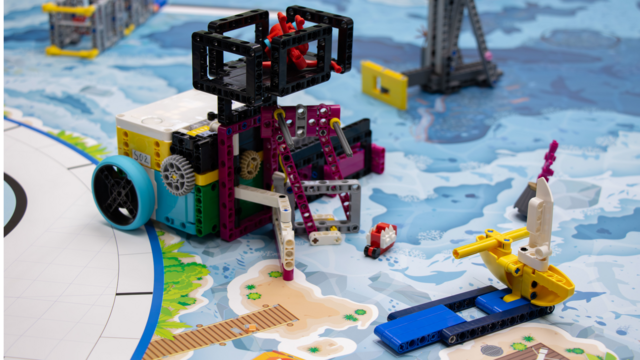
This video tutorial focuses on accomplishing M13 Change Shipping Lanes, and partially M09 Unexpected Encounter and M12 Feed the Whale of the FIRST LEGO League 2024-2025 SUBMERGED Challenge using the Nautiq box robot (a LEGO Education SPIKE Prime robot).
In this run, the robot flips the shipping lane model, collects the small Krill, and retrieves the Unknown Creature from the field by pushing on the mission model. These tasks are executed with precision to ensure that the robot not only scores the primary mission points but also safely returns the collected elements back to base. The sequence is optimized to minimize travel time between missions while maintaining accuracy and control over the robot’s attachments.
We use a pinless, three-in-one design attachment for completing multiple missions in one run. At the front, an angled rubber band mechanism handles M13 Change Shipping Lanes, allowing the robot to launch straight from base without extra positioning.
On one side, a passive curtain mechanism like a cage captures the single Krill for M12 Feed the Whale. On top, a secure basket catches the Unknown Creature from M09 Unexpected Encounter after a push with the robot’s back. The attachment is optimized for quick and reliable mission execution without additional motors.

This is a 10 out of 10 tutorial for a complex robot attachment that does a precise drop and is auto-correcting at the same time. It has decent consistency and reliability. We drop cargo onto the train and use a LEGO Education SPIKE Prime robot for this FIRST LEGO League 2021-2022 competition.

In this video tutorial, we use the motion sensor and demonstrate 10 out of 10 times how we can keep the robot moving in a straight line. The program is described in the previous tutorial in the lesson where we enter into the programming. Here we visualize how consistent and reliable the behavior of the robot is.

In this robotics tutorial, we give a few notes for the teacher about adding an axle to the front of the FTC robot and attaching a plastic plate to this axle to make the robot collect balls.

In this video, we introduce two pieces: beam with pins and the angular beam with pins

Display a matrix on the brick screen. Simple and easy. Download and run the program to see how

This is a video tutorial where we focus on M14 and M15 of FIRST LEGO League 2023-2024 MASTERPIECE Challenge competition. Here, we demonstrate the precision of the attachment. Try to build the attachment and accomplish the missions.

This 10 out of 10 tutorials is about consistency and reliability of the robot when accomplishing 5 missions in a row. We explore how we move between mission models. The programming is in the previous tutorial, here we look and discuss the behaviour of the robot