

Improving FLL Robot Game. Teacher's Note. 9 out of 10 experiments
What should you as a teacher know when the students are trying to achieve a program and robot attachment that could reproduce their behaviour 9 out of 10 times.
- #479
- 15 Apr 2017
What should you as a teacher know when the students are trying to achieve a program and robot attachment that could reproduce their behaviour 9 out of 10 times.


The course contains a number of sections with specific examples and tasks on how you could improve your FIRST LEGO League (FLL) robot game in order to achieve more points. It is designed mostly for after season teams that would like to prepare for next year, but could also work for teams that are currently working on their competition robots.

In this episode we continue from Episode 55 and we improve the durability and stability of the attachment for a LEGO Mindstorms EV3 robot. Many times attachments are not very stable which results in gaps between parts. The goal of the video is to give basic construction ideas.

In this video tutorial we will show you three ways for making your robot stable on the field. We will present each one of them with their advantages and disadvantages - it's up to you to choose which one is the best for your case.

Sometimes the way an axle is placed is just not suitable for a certain attachment and you should transfer the motion to another axle a few LEGO units above the current.


This Program controls the Module With Aligning Attacher for M08 - Aerobic Exercise. This is a demo program to show how to move robot acurately to the modul. Also how to attach the robot to the modul and acomplish the mission.

The M07. SPACE WALK EMERGENCY is one of the most interesting missions in FLL the we've even seen. This video tutorial demonstrates a mission run for Mission 07 Emergency Walk in FIRST LEGO League 2018-2019 Into Orbit robotics competition. The tutorial contains only the mission run on the field. We accomplish a single mission.


These are instructions on how to build the:
You can find more building instructions and tips and tricks about the competition on this page.

These are instructions on how to build the:
You can find more building instructions and tips and tricks about the competition on this page.

This is an attachment trigger from the robot inertial. It's built with LEGO Education SPIKE Prime parts and it demonstrates how to move with the robot, stop, the attachment activates and it collects a few parts. The goal of the attachment is to collect parts from the field without the use of any motors. It is an easy and quick way to build an attachment for FIRST LEGO League/World Robotics Olympiad and other robotics competition. The principle is the same. The attachment is designed for Luly, small LEGO Education SPIKE Prime competition robot with 3D building instructions

In this tutorial we demonstrate how a loops mission could be accomplished with a Push/Pull Attachment. The robot attachment could be adapted to other missions at FIRST LEGO League/World Robotics Olympiad and other robotics competitions that require push/pull. The principle is the same. The tutorial uses Luly, small LEGO Education SPIKE Prime competition robot with 3D building instructions as a robot base.

The Cell Phone mission is part of the FIRST LEGO League 2020 RePlay competition. The goal of the mission is to flip the Cell Phone. In this video tutorial we use a LEGO Education SPIKE Prime robot to flip the cell phone. This mission is similar to the FLL 2017: How to accomplish Manhole Cover (08th) Mission in FIRST LEGO League 2017-2018.

This is a true 10 out of 10 video tutorial. The robot accomplishes the Weight Machine mission from the FIRST LEGO League 2021 RePlay competition every single time. The attachment demonstrate a mechanism that performs and is stable on every try

These are instructions on how to build the:
You can find more building instructions and tips and tricks about the competition on this page.

These are instructions on how to build the:
You can find more building instructions and tips and tricks about the competition on this page.

These are instructions on how to build the:
You can find more building instructions and tips and tricks about the competition on this page.

Activate the heavy lifting attachment with a Scratch program
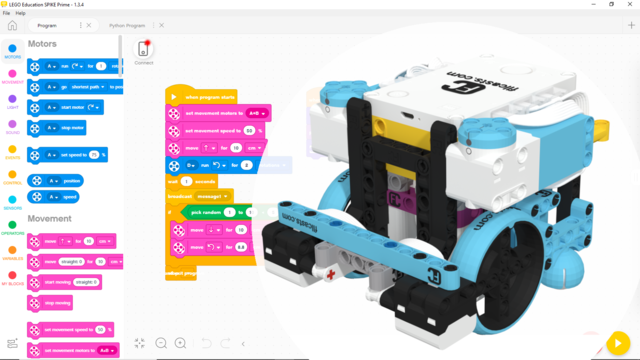
In this program we demonstrate how to program a SPIKE robot to align to а line with the aid of two color sensors while moving backward. Make sure the line is big enough for the sensor to detect it. For this program to work, the sensors must be placed in front of the wheels.
This program was intended for and tested on the Gazon robot

In this program, we demonstrate how to program a SPIKE robot to follow a line with the aid of one color sensor and detect and stop at the second intersection with the aid of another color sensor. Make sure the line is big enough for the sensor to detect it and react to it. For some thinner lines, the speed of the robot can be lowered, but if that does not help, the program can be easily adapted to work with reflected light intensity.
This program was intended for and tested on the Gazon robot

