

EV3 basics course. Color Sensor. Tasks (part 6)
Tasks on using the LEGO EV3 Mindstorms Color sensor. Quite fun and useful for different STEM classes or just to get to know the sensor.
- #152
- 28 Oct 2015
Tasks on using the LEGO EV3 Mindstorms Color sensor. Quite fun and useful for different STEM classes or just to get to know the sensor.

We are showing the first way we could position the motors on the robot construction. This seems to be challenging for many robot builders and that's why we are going to do it in a few different ways in the next few video tutorials from the series.

The LEGO EV3 Mindstorms brick can be programmed from the brick itself. The motors can be moved forward/backward and even simple programs could be implemented without even touching the EV3-G software at the computer


The attachment shows how to do build a pinless robot attachment with LEGO EV3 Mindstorms.

We will cover the names and the basic usage of the parts in our typical robot.

We will demonstrate the common mistakes students make when building a robot.

This is a tutorial with 10 runs - 5 of them are slow and 5 of them are fast and we measure how accurate the robot is each time. How consistent is it? Can it arrive consistently on a specific location on the field without the use of the sensors? The quick answer is - No, it can not. But let's see it life

Continuing from the last tutorial, we demonstrate the consistency and reliability of the robot when we don't user sensors. The result is pretty obvious - the robot is NOT consistent and reliable. It just makes a lot of mistakes

Without the use of the sensors, make sure that you are at least using "set movement acceleration to slow". In this tutorial we will demonstrate why and how this helps us improve the accuracy and consistency of the robot.

This is a 10 runs tutorial that demonstrates how the accuracy of the robot improves when we use slow acceleration vs fast or default acceleration. Note that the improvement is small. This is not an accurate and consistent robot. No. This is a robot that is all but accurate or consistent. It does not use sensors and you should use sensors. But it is a teaching/demonstration moment for everybody to seen what is it that you can expect if you don't use sensors.

We will build the EasyBot quick robot and will explain how to follow building instructions.

In this video we discuss how do we transfer power from the motors that are "inside the robot box" to the gear wheels that are "outside the robot box".

Now we have to program the robot. The steps that we will cover are starting the software, writing a program and downloading it to the robot.
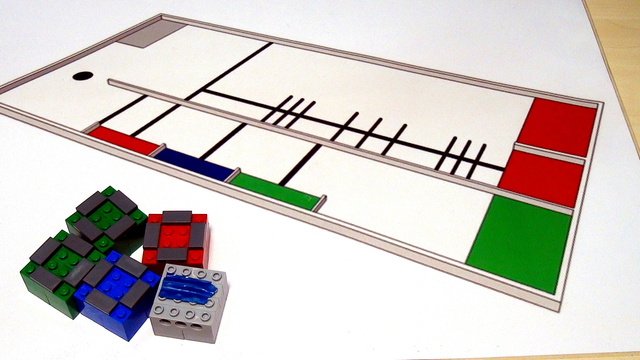
We are working on the World Robotics Olympiad (WRO) 2013 competition and its elementary part. The series will introduce three different concepts and this would be Arrays, Menus and Counting different lines. In the video you will see the robot working as it is in the final stage.

There are some things to be careful about when your students work with the brick.