Box Robot Two.Left side attachment with self-locking
This one is very special- an attachment that could lock itself on purpose while working.
- #509
- 27 Mar 2017
This one is very special- an attachment that could lock itself on purpose while working.
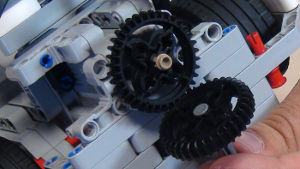
Sometimes the way an axle is placed is just not suitable for a certain attachment and you should transfer the motion to another axle a few LEGO units above the current.
Need to transfer circular into a linear motion. You need a rack. Here is an attachment with a rack for our box robot.
The Sports Utility Vehicle box robot is the new marvelous box robot that we've created. It is designed for teams that would like to learn how to build balanced, stable and working robot chassis following our box principle. It is smaller and easier to build than box robot 1 and it is more simple than box robot 2.
The main advantages of this robot compared to previous box robots are
- motors in the right direction, so when rotating the motor forward, the robot moves forward.
- it is much easier to attach attachments. There are 4 different gears on which you could attach attachments.
- it has a large clearance - which means that it could move over obstacles.
Of course, it has a Gyro and two Color Sensors. Not only that, but we have all the cables shown in the construction.
The SUV Box robot is design to be used with a Gyro sensor and two Color Sensors for alignment. It is not working well for following lines as the sensors are very high and they are very high to allow for high clearance of the chassis. If you need to follow lines we recommend the Dominator X-Y robot
- [How NOT To] Build An Active Attachment For SUV Box Robot
- Simple Pinless Attachment for the SUV Box Robot
Recap on the attachments, their purpose and how you should use them.
This is a frame for the SUV Box Robot. Tis frame is an adapter between the robot and the attachments. You can add-in several attachments on it and mount them on the robot simultaneously with one movement.
The frame has two locks that make the attachments stick to the robot. Also the front Knobs must not be used for very powerful activities due to jumpings, unless the frame with attachments become heavy enough to prevent any jumping of the frame.
This is a self aligning passive attachment for rendezvous and meeting between the tube module and the habitation hub.
The program for this attachment is Self Aligning Module Attacher for M06 - Space Station Modules.
There is another program at Self Aligning Module Attacher for M06 - Space Station Modules - another program.
Would you like to resolve all the problems with the light/color sensors that you have? And to make all of them work in a predictable, stable way even when using more than one MINDSTORMS colour sensors.
When using Color sensors it is important to calibrate them depending on the light conditions in your venue. In this way, the calibrated sensor will show values between 0 and 100 independent of the light conditions. But using the default EV3 colour calibration available in the colour sensor block could lead to unpredicted problems that are difficult to track and resolved especially when used with multiple Color sensors. So in this series of tutorial we implement the calibration ourselves discussing the principles of colour sensor calibration.
"Array initialization" is the first step in every program that involves Arrays. This applies to most programming languages and for EV3-G it is a must.
In this tutorial, we would show you how to initialize the array and how to extract this logic in a new block
In this tutorial, we would implement a program that finds the minimum and maximum value detected by the sensor and stores this two values in an array.
In the course section for Advance Sensor Calibration we previously showed you how to find the minimum and maximum value for a single LEGO Mindstorms Color Sensor and to store this value in an array. The program was implemented with the EV3-G software. In this tutorial we are going to find the Min and Max for all the four sensors and to store all the 8 values in an array.
Following the Advance Sensor Calibration course section, we found the min and max values detected by each sensor. Now it is time for the real deal of the calibration. Detect the current value from the sensor and find what is the percentage of this value for the range between min and max.
Many times we just upload blocks and leave it up to you to use it. In this tutorial, I would like to show you how to use the implemented blocks. How to import them into the EV3-G software. How to see them in the palette. How to drag and drop them to build a working program.
Implement the program for array initialization.
Follow the video tutorials for initializing arrays and implement the program.
As an exercise try to implement the calibration of the minimum and maximum values for a single sensor.