
Boccia M08 FIRST LEGO League 2020-2021 RePLAY Challenge
Boccia is an interactive mission with the opposing team. Talk with the other team so the robots send matching colored cubes onto the opposite field.
- #1667
- 31 Aug 2020
Boccia is an interactive mission with the opposing team. Talk with the other team so the robots send matching colored cubes onto the opposite field.


This FRIST LEGO League video tutorial is about he Boccia Share mission from FIRST LEGO League 2020 RePlay competition. In the tutorial we demonstrate how to push on a lever to release a mission model part - in this case a box. You have the choice before the competition to cooperate with the other team and to decide if you are going to do the blue or the red box.

The final video from the course. The robot escapes the state where it is lost. This happens if it can not continue in any direction.

In this video tutorial we look at programming the Kriket box robot to accomplish 5 missions. It is a long program for a long run that's why we are dedicating a separate tutorial. We are using LEGO Education SPIKE Prime Word Blocks app.
This is a programming video tutorials. It uses LEGO Education Word Blocks which is the scratch version. We enter into details of how to accomplish missions in a tight spot, how to align the robot and how to make it repeatable.

In this video tutorial we take a next step in programming reliable and consistent robots and this is to learn how to stop at a second intersection. We need this because most of the time when we want to reach a mission model on a robotics competition field, the model will be located away from us and we must use all kind of technique to reach it. In this tutorial - we stop at a second intersection.

With this video tutorial we demonstration the consistency and reliability of the using an intersection to position on the field. We move forward and we stop at the first intersection. We detect the intersection with a sensor. In the whole 10 runs there isn't a single mistake and you can see the precision of the robot on each run. Check it out and experiment with the same program for your robot.

We discuss the state of "Lost" and the different ways we could escape this state. We also build the next step of our State machine programming pattern where the next state is determined by the previous state.

We can Turn Right. We can Turn Left. How do we decide which way to go if there are lines both to the left and to the right. Check out the video.

This is a recording of a completely perfect, 10 out of 10 accomplishment of a two-part mission - Train tracks, from the FIRST LEGO League 2021-2022 Cargo Connect competition. Due to the proper use of motion and color/light sensors, the robot is 100% consistent and reliable for a non-trivial mission. Even when the robot makes a mistake, it auto-corrects and compensates for this mistake.

In this episode I would like to show you how to enable the communication between the computer and the NXT brick, through the USB and using the leJOS project. Starting leJOS on Windows is pretty easy. But starting the samples and achieving the communication is the actual problem.

This robot has a color sensor and this sensor is used for following lines. Additional Mindstorms EV3 sensors could be place on the robot, like a Gyro sensor or a second Color sensor.
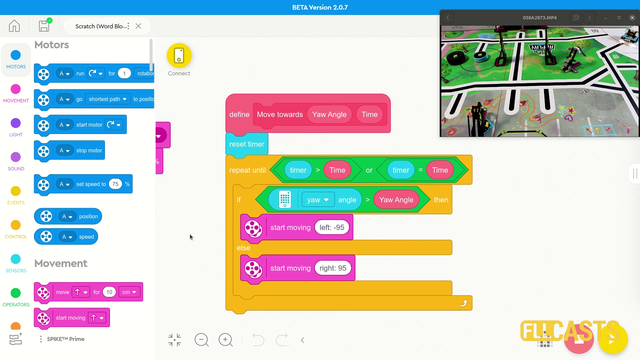
In this video tutorial we use the LEGO Education SPIKE Prime Motion Sensor to reach a mission model on the field. It's a basic use of the motion sensor that we will extend in the next few tutorials and in the same time we take the opportunity to demonstrate what a MyBlock is and how to develop one. As a result of this video you will learn how to make the program easier to read and maintain by organizing the blocks in the program in special MyBlocks that couple them all together.

Starting leJOS might be very problematic, since you need to install a few libraries and make some configurations. In this video tutorial I am showing a step-by-step guide on how you could install leJOS on your Ubuntu Linux. And it is quite easy.

Take the hacksaw, the drill and let's cut the pipe.